Create a sitemap for your website and boost your SEO score
Sitemaps are an important part of web design and SEO. In this article, we will discuss what sitemaps are and why they are important. We will also show you how to create a sitemap for your website.
3
min read
Illustration: Website sitemap to let search engines understand content structure and hierarchy – leading to better search result ranking.
What is a Sitemap?
A sitemap is a map of your website that shows the hierarchy of pages and how they are connected. It helps web designers and developers understand the structure of your website and makes it easier to find pages or sections on your site. Sitemaps can also be used by search engines to help index your website content.
Why Are Sitemaps Important?
- They help you track the progress of your website development project. You can use them to see which pages have been added or changed since the last version of your sitemap was created.
- They improve navigation for users by providing an easy way to view all the available pages on your website at once.
- They improve search engine visibility by helping Google and other search engines index your website content more effectively.
- They make it easy for visitors to contact you with feedback or questions about your website.
How do I create a sitemap?
1. Manual Method:
The manual method involves creating a list of all the pages on your website by hand. This can be time-consuming and difficult, especially if you have a large website.
2. XML Sitemap Generator:
An XML Sitemap Generator is software that automatically generates a sitemap for you. All you need to do is input the URLs of all the pages on your website and the generator will take care of the rest.
3. Online tool:
There are many online tools available that allow you to create a sitemap quickly and easily. Simply enter the URL of your homepage and the tool will generate a complete list of all the pages on your website.
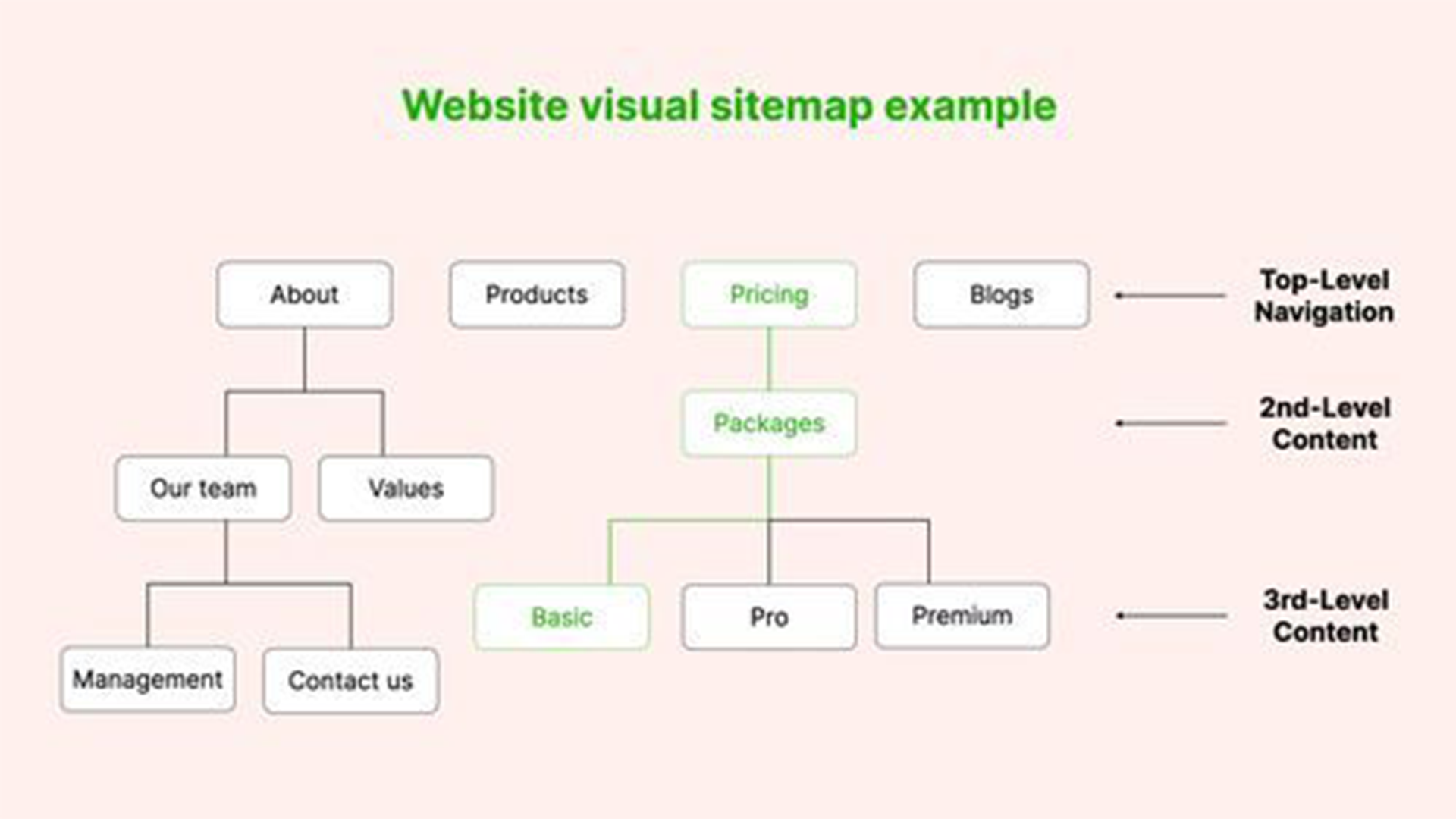
Illustration: Example of a website sitemap structure with levels of priority for pages in a website.
There are a number of different online sitemap generator tools available on the internet. Here are Flavur's top online sitemap generator recommendations:
- Google Sitemaps Generator:
This tool is offered by Google and is one of the most popular generators on the internet. It allows you to create both xml and html sitemaps, as well as add images and videos to your map. You can also set up notification preferences so that you are alerted when changes are made to your website.
- Screaming Frog SEO Spider:
This tool scans websites and produces an interactive site map with details on each page, including its size, last modified date, and status code. It is also free to use.
- SEO Powersuite:
This tool from SEMrush helps you optimize your website for better search engine rankings. In addition to generating a site map, it also analyzes internal links, anchors, duplicate content, etc. It offers both paid and unpaid versions.
- XML-Sitemaps.com:
This tool is also simple to use and creates xml sitemaps quickly and easily. You can customize your maps with a variety of settings, including priority levels, change frequencies, and exclusion rules.
Sitemap generators: Google, Screaming Frog, SEO Powersuite and XML Generator.
No items found.
What is a Sitemap?
A sitemap is a map of your website that shows the hierarchy of pages and how they are connected. It helps web designers and developers understand the structure of your website and makes it easier to find pages or sections on your site. Sitemaps can also be used by search engines to help index your website content.
Why Are Sitemaps Important?
- They help you track the progress of your website development project. You can use them to see which pages have been added or changed since the last version of your sitemap was created.
- They improve navigation for users by providing an easy way to view all the available pages on your website at once.
- They improve search engine visibility by helping Google and other search engines index your website content more effectively.
- They make it easy for visitors to contact you with feedback or questions about your website.
How do I create a sitemap?
1. Manual Method: The manual method involves creating a list of all the pages on your website by hand. This can be time-consuming and difficult, especially if you have a large website.
2. XML Sitemap Generator: An XML Sitemap Generator is software that automatically generates a sitemap for you. All you need to do is input the URLs of all the pages on your website and the generator will take care of the rest.
3. Online tool: There are many online tools available that allow you to create a sitemap quickly and easily. Simply enter the URL of your homepage and the tool will generate a complete list of all the pages on your website.
There are a number of different online sitemap generator tools available on the internet. Here are Flavur's top online sitemap generator recommendations:
- Google Sitemaps Generator: This tool is offered by Google and is one of the most popular generators on the internet. It allows you to create both xml and html sitemaps, as well as add images and videos to your map. You can also set up notification preferences so that you are alerted when changes are made to your website.
- Screaming Frog SEO Spider: This tool scans websites and produces an interactive site map with details on each page, including its size, last modified date, and status code. It is also free to use.
- SEO Powersuite: This tool from SEMrush helps you optimize your website for better search engine rankings. In addition to generating a site map, it also analyzes internal links, anchors, duplicate content, etc. It offers both paid and unpaid versions.
- XML-Sitemaps.com: This tool is also simple to use and creates xml sitemaps quickly and easily. You can customize your maps with a variety of settings, including priority levels, change frequencies, and exclusion rules.
Create a sitemap for your website and boost your SEO score
Sitemaps are an important part of web design and SEO. In this article, we will discuss what sitemaps are and why they are important. We will also show you how to create a sitemap for your website.
3
min read
Illustration: Website sitemap to let search engines understand content structure and hierarchy – leading to better search result ranking.
What is a Sitemap?
A sitemap is a map of your website that shows the hierarchy of pages and how they are connected. It helps web designers and developers understand the structure of your website and makes it easier to find pages or sections on your site. Sitemaps can also be used by search engines to help index your website content.
Why Are Sitemaps Important?
- They help you track the progress of your website development project. You can use them to see which pages have been added or changed since the last version of your sitemap was created.
- They improve navigation for users by providing an easy way to view all the available pages on your website at once.
- They improve search engine visibility by helping Google and other search engines index your website content more effectively.
- They make it easy for visitors to contact you with feedback or questions about your website.
How do I create a sitemap?
1. Manual Method:
The manual method involves creating a list of all the pages on your website by hand. This can be time-consuming and difficult, especially if you have a large website.
2. XML Sitemap Generator:
An XML Sitemap Generator is software that automatically generates a sitemap for you. All you need to do is input the URLs of all the pages on your website and the generator will take care of the rest.
3. Online tool:
There are many online tools available that allow you to create a sitemap quickly and easily. Simply enter the URL of your homepage and the tool will generate a complete list of all the pages on your website.
Illustration: Example of a website sitemap structure with levels of priority for pages in a website.
There are a number of different online sitemap generator tools available on the internet. Here are Flavur's top online sitemap generator recommendations:
- Google Sitemaps Generator:
This tool is offered by Google and is one of the most popular generators on the internet. It allows you to create both xml and html sitemaps, as well as add images and videos to your map. You can also set up notification preferences so that you are alerted when changes are made to your website.
- Screaming Frog SEO Spider:
This tool scans websites and produces an interactive site map with details on each page, including its size, last modified date, and status code. It is also free to use.
- SEO Powersuite:
This tool from SEMrush helps you optimize your website for better search engine rankings. In addition to generating a site map, it also analyzes internal links, anchors, duplicate content, etc. It offers both paid and unpaid versions.
- XML-Sitemaps.com:
This tool is also simple to use and creates xml sitemaps quickly and easily. You can customize your maps with a variety of settings, including priority levels, change frequencies, and exclusion rules.
Sitemap generators: Google, Screaming Frog, SEO Powersuite and XML Generator.
No items found.
What is a Sitemap?
A sitemap is a map of your website that shows the hierarchy of pages and how they are connected. It helps web designers and developers understand the structure of your website and makes it easier to find pages or sections on your site. Sitemaps can also be used by search engines to help index your website content.
Why Are Sitemaps Important?
- They help you track the progress of your website development project. You can use them to see which pages have been added or changed since the last version of your sitemap was created.
- They improve navigation for users by providing an easy way to view all the available pages on your website at once.
- They improve search engine visibility by helping Google and other search engines index your website content more effectively.
- They make it easy for visitors to contact you with feedback or questions about your website.
How do I create a sitemap?
1. Manual Method: The manual method involves creating a list of all the pages on your website by hand. This can be time-consuming and difficult, especially if you have a large website.
2. XML Sitemap Generator: An XML Sitemap Generator is software that automatically generates a sitemap for you. All you need to do is input the URLs of all the pages on your website and the generator will take care of the rest.
3. Online tool: There are many online tools available that allow you to create a sitemap quickly and easily. Simply enter the URL of your homepage and the tool will generate a complete list of all the pages on your website.
There are a number of different online sitemap generator tools available on the internet. Here are Flavur's top online sitemap generator recommendations:
- Google Sitemaps Generator: This tool is offered by Google and is one of the most popular generators on the internet. It allows you to create both xml and html sitemaps, as well as add images and videos to your map. You can also set up notification preferences so that you are alerted when changes are made to your website.
- Screaming Frog SEO Spider: This tool scans websites and produces an interactive site map with details on each page, including its size, last modified date, and status code. It is also free to use.
- SEO Powersuite: This tool from SEMrush helps you optimize your website for better search engine rankings. In addition to generating a site map, it also analyzes internal links, anchors, duplicate content, etc. It offers both paid and unpaid versions.
- XML-Sitemaps.com: This tool is also simple to use and creates xml sitemaps quickly and easily. You can customize your maps with a variety of settings, including priority levels, change frequencies, and exclusion rules.